Guides › Redact insurance documents
How to redact insurance documents (claims, EOBs, policies)
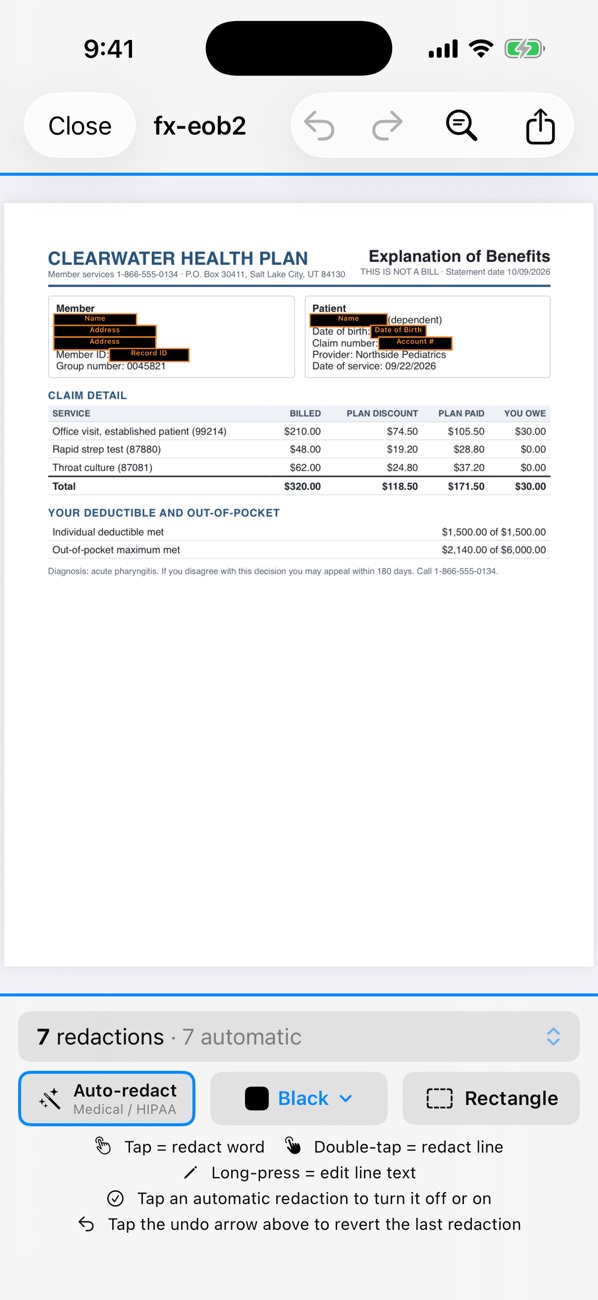
Insurance paperwork mixes identifiers (member, policy and claim numbers, SSN, date of birth) with personal details (name, address, sometimes diagnoses). Before sending one to an employer, a lawyer or a second insurer, remove what they don’t need. PDF Redact’s Medical / HIPAA preset removes names, addresses, phone numbers, emails, SSNs, dates of birth, account numbers and member or record numbers, all on your device.
- Open the claim, explanation of benefits or policy in PDF Redact.
- In the detection settings, choose Medical / HIPAA.
- Turn off anything the recipient must see, for example your name or the dates of service, by tapping its redaction.
- Cover diagnosis or procedure descriptions by hand if they aren’t needed: double-tap the line.
- Export the verified file.
Commonly hidden
- Member, subscriber and group numbers
- Policy and claim numbers
- SSN and date of birth
- Names of dependents
- Diagnosis and procedure details

PDF RedactWorks on iPhone, iPad and Mac. Your first export is free.

Questions
- Are claim numbers detected?
- Reference-style numbers, including member and record numbers, are covered by the Medical presets. Check each page; formats vary between insurers.
Related guides
- Redact medical recordsRemove patient identifiers, including a Safe Harbor-style preset.
- Redact a Social Security numberRemove SSNs from any PDF, or keep only the last four digits.
- Redact without uploadingWhy on-device redaction matters for sensitive files.
Updated 2026-10-29.