Guides › Redact a Social Security number
How to redact a Social Security number from a PDF
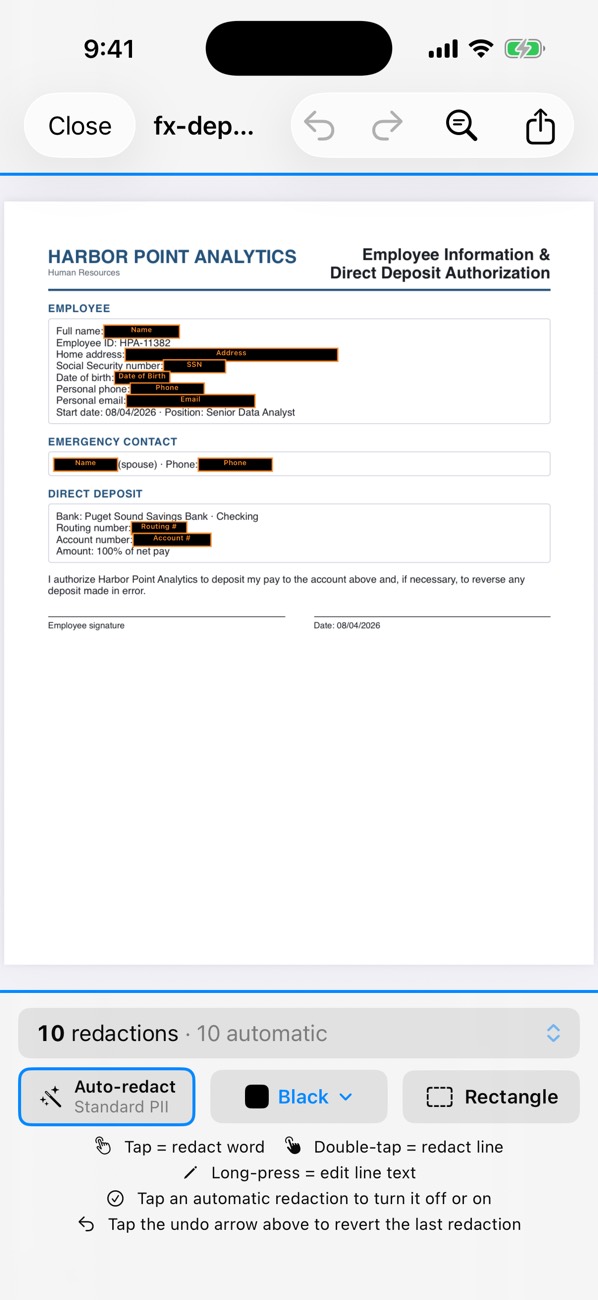
Open the PDF in PDF Redact: Social Security numbers are detected automatically in every preset, whether written 123-45-6789, 123 45 6789 or 123456789. Export, and the digits are removed from the file. If a court or agency wants the last four digits, turn on the court-filing format first.
- Open the document in PDF Redact on iPhone, iPad or Mac.
- Check that every SSN is boxed, including in headers, footers and form fields. Use Find & Redact with the last four digits to catch any copy written differently.
- Need only the last four? Open the detection settings (Filters, or Auto-redact in newer versions) and turn on Court filing format; it leaves the last four digits of SSNs, taxpayer-ID and account numbers and the year of birth visible.
- Export. The audit confirms no redacted digits remain anywhere in the file.
Where SSNs hide
- Form fields (typed values on W-4s, I-9s, applications).
- Scanned pages and photos, which need text recognition to find.
- Repeated headers and footers on every page.
- Document metadata and comments, which a box drawn on the page doesn’t touch.

PDF RedactWorks on iPhone, iPad and Mac. Your first export is free.

Questions
- Does it catch SSNs in scanned documents?
- Yes. Scans and photos are read with on-device text recognition before detection runs.
- What about ITINs and EINs?
- Taxpayer identification numbers are covered too; the Tax Documents preset adds EINs.
Related guides
- Redact a W-2, 1099 or tax returnHide SSNs, EINs and account numbers on tax forms.
- Redact a court filingFed. R. Civ. P. 5.2 and Bankruptcy Rule 9037: last four digits.
- Check a PDF is really redactedFour tests that catch fake redactions before you send.
Updated 2026-10-29.