Guides › Check a PDF is really redacted
How to check that a PDF is really redacted
A PDF is properly redacted only if the hidden text is gone from the file, not just covered. Test it: search the PDF for a redacted word, select all and paste into a text editor, check the document’s properties for an author or title, and look for the same number elsewhere in the file. If any test shows the hidden information, the redaction failed.
The four tests
- Search. Open the redacted PDF and search for a word or number you hid. Any match means the text is still there.
- Copy and paste. Select all the text on a redacted page, copy it, and paste it into Notes or a text editor. Redacted text should not appear.
- Properties. Check the document’s metadata (on Mac: Preview → Tools → Show Inspector). Author, title and subject fields can leak names.
- Hidden copies. Look for the same information in headers, footers, form fields, comments, bookmarks and attachments.
Let the app check for you
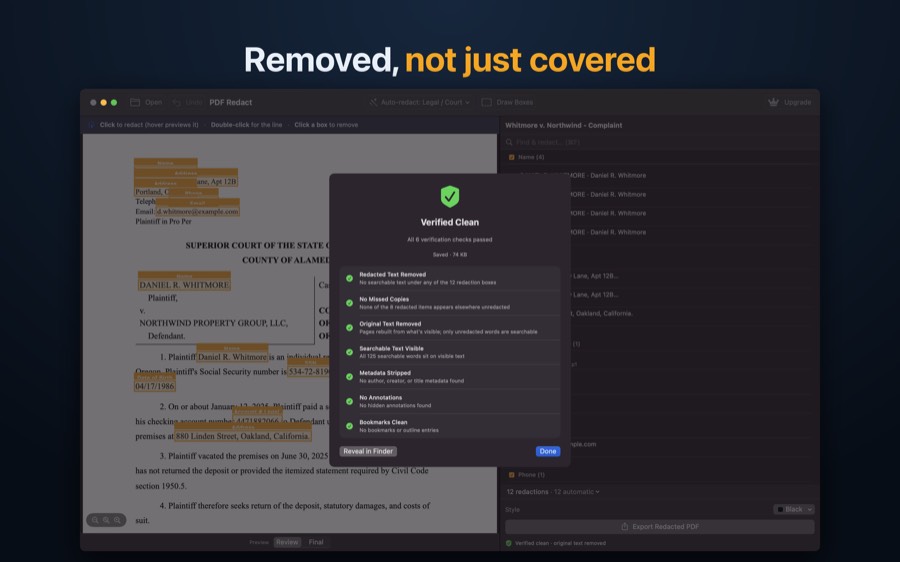
PDF Redact runs these checks automatically on every export and only reports Verified Clean when all of them pass:
- Redacted text removed — no searchable text sits under any redaction box.
- No missed copies — nothing you redacted still appears unredacted somewhere else in the file.
- Original text removed — pages are rebuilt from what is visible, so only unredacted words remain searchable.
- Searchable text visible — the text you kept is still searchable.
- Metadata stripped — no author, creator or title metadata.
- No annotations and bookmarks clean — comments, hidden annotations and outline entries are gone.
PDF RedactWorks on iPhone, iPad and Mac. Your first export is free.

Questions
- Why do black boxes fail?
- A box drawn with an annotation or markup tool is a separate layer. The original text stays in the file and can be copied, searched or revealed by deleting the box.
- Is printing to PDF enough?
- Not reliably. Some print paths flatten the page into an image, others keep the text layer. Test the result.
Related guides
- Redact a PDF on iPhoneFind and permanently remove personal details, on the phone.
- Redact a PDF on MacPreview’s Redact tool vs. automatic detection on the Mac.
- Redact a court filingFed. R. Civ. P. 5.2 and Bankruptcy Rule 9037: last four digits.
Updated 2026-10-29.