Guides › Redact a PDF on Mac
How to redact a PDF on a Mac
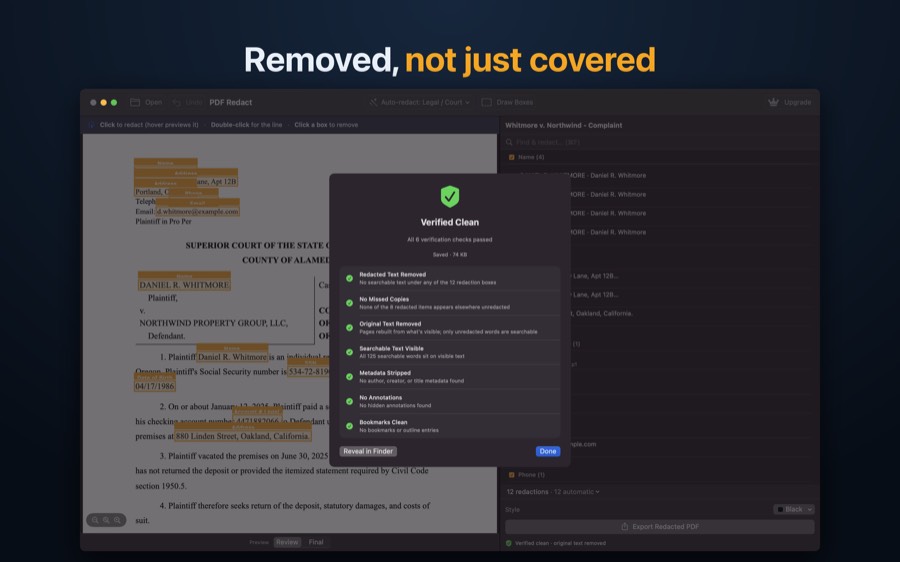
For a quick, manual job, Preview (macOS 11 and later) has Tools → Redact: select text or an area and it is removed when you save. For longer documents, or when you need to be sure you caught everything, PDF Redact for Mac finds names, addresses, SSNs and account numbers automatically, lists them by category, and audits the exported file. Don’t use Preview’s Markup rectangles; they are annotations and leave the text underneath.
Option 1: Preview’s Redact tool
- Open the PDF in Preview.
- Choose Tools → Redact, then drag across the text or area to remove.
- Save. Preview removes the redacted content from the saved file.
Preview doesn’t find anything for you: you have to spot every name and number yourself, on every page, including headers and footers. It also won’t tell you if a copy of the same number is still elsewhere in the document.
Option 2: PDF Redact for Mac
- Open the PDF (or drag it onto the window). PDF Redact reads it on your Mac and redacts personal information automatically, using a preset that matches the document.
- Check the redactions it found, listed in the sidebar. Click to redact a word, double-click for a line, or drag to draw a box. Use the sidebar’s find field to redact every match of a word or number.
- Click Export Redacted PDF. The privacy audit runs and reports Verified Clean when no redacted text, metadata, annotations or hidden copies remain.
Which should you use?
| Preview | PDF Redact | |
|---|---|---|
| Price | Built in | First export free, then subscription or one-time pack |
| Finds personal info for you | No | Yes: names, addresses, SSNs, account and card numbers, phones, emails, dates of birth |
| Find every occurrence | Manual | Find & redact all matches |
| Checks the exported file | No | Privacy audit (text, copies, metadata, annotations, bookmarks) |
| Court-filing format (last four digits) | Manual | Built in |
| Batch | No | Yes |
PDF RedactWorks on iPhone, iPad and Mac. Your first export is free.

Questions
- Which macOS versions does PDF Redact support?
- macOS 13 Ventura or later.
- Does it upload anything?
- No. Everything runs on your Mac.
- Is the Mac version a separate purchase?
- No. iPhone, iPad and Mac share one App Store purchase.
Related guides
- Acrobat vs Preview vs PDF RedactWhich redaction tool fits which job, honestly.
- Check a PDF is really redactedFour tests that catch fake redactions before you send.
- Redact a court filingFed. R. Civ. P. 5.2 and Bankruptcy Rule 9037: last four digits.
Updated 2026-10-29.