How to redact a court filing (FRCP 5.2 and Bankruptcy Rule 9037)
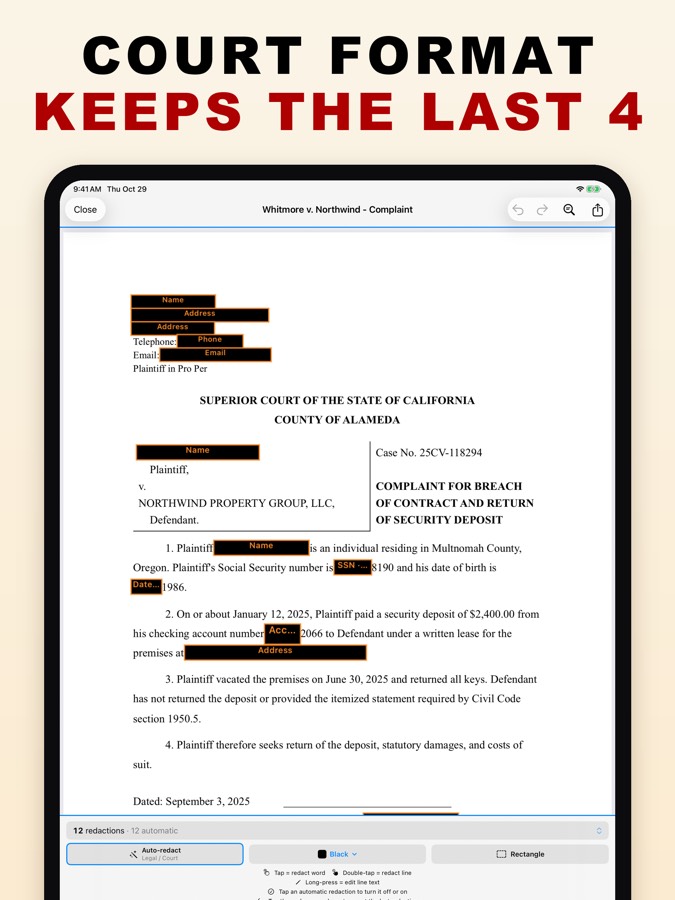
Federal Rule of Civil Procedure 5.2(a) and Bankruptcy Rule 9037(a) let a filing include only the last four digits of a Social Security or taxpayer-ID number and of a financial-account number, only the year of a birth date, and only a minor’s initials. PDF Redact’s court-filing format applies the number and date rules automatically: it leaves the last four digits and the birth year visible and removes the rest.
What the federal rules require
| Identifier | May appear in a filing as |
|---|---|
| Social Security or taxpayer-ID number | Last four digits |
| Financial-account number | Last four digits |
| Date of birth | Year only |
| Name of a minor | Initials only |
Many state courts have similar rules, for example California Rules of Court, rule 1.201. Check your court’s local rules; some require more.
Steps
- Open the filing in PDF Redact. It recognises legal documents and applies the Legal / Court preset.
- Open the detection settings (Filters, or Auto-redact in newer versions) and turn on Court filing format.
- Names stay fully covered. For a minor, uncover their initials by hand.
- Export. The exported PDF keeps all unredacted text searchable, which many e-filing systems require for briefs, and the audit confirms nothing redacted remains.
Avoid the classic mistake
Several high-profile filings have been exposed because black boxes were drawn over text that could still be copied, including a 2019 filing by Paul Manafort’s lawyers. Exported pages in PDF Redact are rebuilt from what is visible, and the audit checks that no redacted text remains underneath.


Questions
- Does the exported file stay text-searchable?
- Yes. Unredacted text stays searchable and the file is saved as PDF/A.
- Does it handle exhibits that are scans?
- Yes. Scanned exhibits are read with on-device text recognition.
Related guides
- Redact a family-court financial disclosureDivorce and custody filings: last four digits, minors’ initials.
- Redact a Social Security numberRemove SSNs from any PDF, or keep only the last four digits.
- Check a PDF is really redactedFour tests that catch fake redactions before you send.
Updated 2026-10-29.