Guides › Redact a family-court financial disclosure
How to redact a financial disclosure for family court
Financial disclosures in divorce and custody cases are full of account numbers, SSNs and children’s details. When a copy is filed with the court and becomes part of the public record, most courts allow only the last four digits of SSNs and account numbers, the year of birth and a minor’s initials. PDF Redact’s court-filing format applies the number and date rules automatically.
Filed versus exchanged
Redaction rules usually apply to what you file with the court. Copies you serve on the other party are often required to be complete. Check your state’s rules or your court’s self-help center; many states follow the same last-four-digits rule as the federal courts (for example California Rules of Court, rule 1.201).
Steps
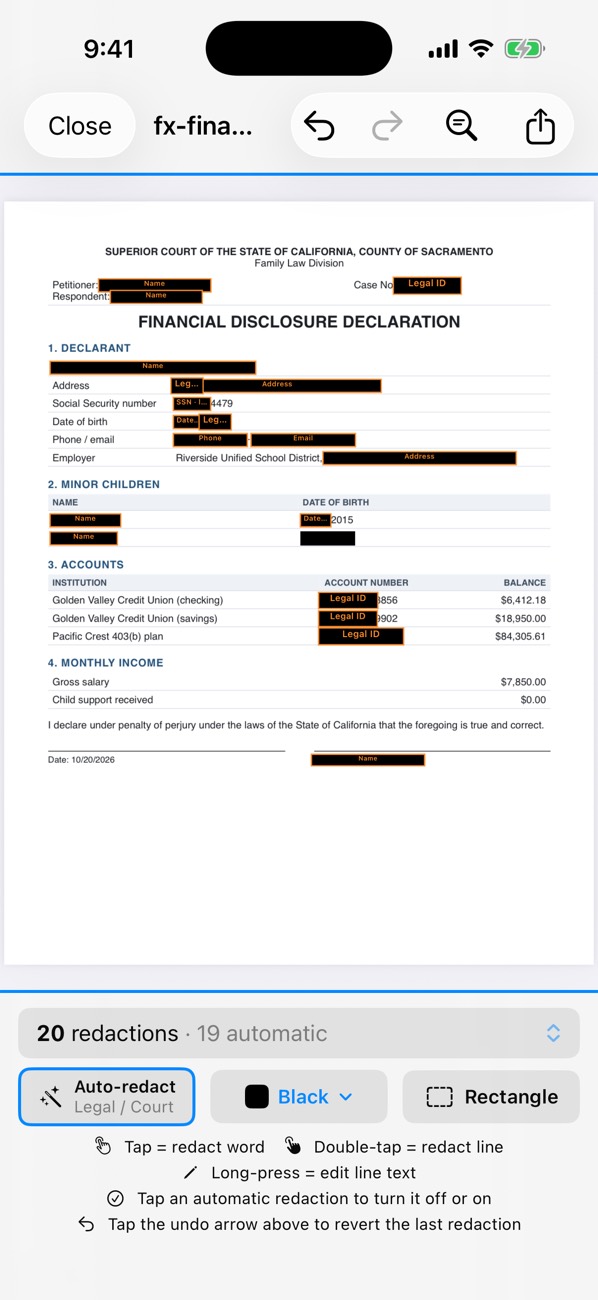
- Open the affidavit or disclosure in PDF Redact. It recognises legal documents and applies the Legal / Court preset.
- Open the detection settings and turn on Court filing format. SSNs, taxpayer-ID and account numbers keep their last four digits; dates of birth keep the year.
- Children’s names are fully covered; uncover their initials by hand if your court wants them.
- Check attachments such as bank statements and pay stubs inside the same PDF; the preset covers them too.
- Export. Unredacted text stays searchable, which many e-filing systems require.

PDF RedactWorks on iPhone, iPad and Mac. Your first export is free.

Questions
- Can I redact the attached bank statements in the same file?
- Yes. Redaction runs across every page of the PDF, including attached statements.
Related guides
- Redact a court filingFed. R. Civ. P. 5.2 and Bankruptcy Rule 9037: last four digits.
- Redact a bank statementFor a rental, loan or job application: what to hide and what to keep.
- Redact a pay stubProve income without exposing your SSN or bank account.
Updated 2026-10-29.