How to redact a bank statement
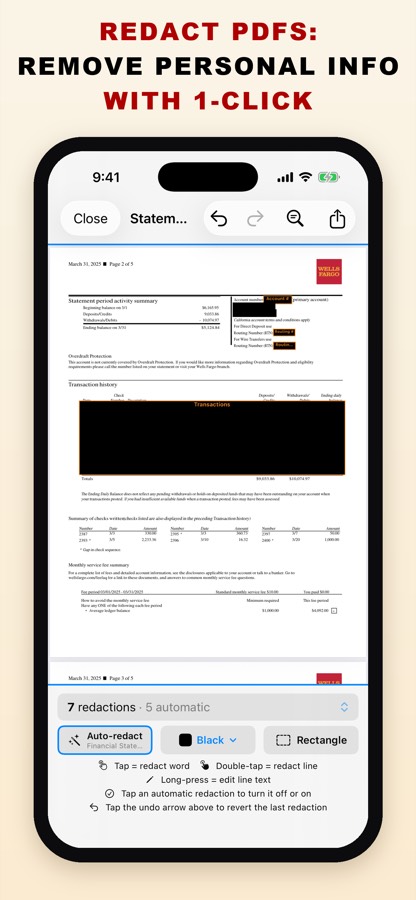
Most people who ask for a bank statement need to see that the account is yours and how much is in it, not your full account number or every purchase. So hide the account and routing numbers (and the transactions, if the recipient doesn’t need them) and keep your name, the statement period and the balances. PDF Redact’s Financial Statement preset does exactly that automatically, and the export removes the hidden text instead of covering it.
What to hide and what to keep
| Usually hide | Usually keep |
|---|---|
| Account number (or all but the last four digits) | Your name and address |
| Routing number | Bank name and statement period |
| Individual transactions you don’t need to show | Opening, closing and average balances |
| Card numbers, check images, reference numbers | Income deposits, if you are proving income |
Ask the recipient first. Some lenders, especially mortgage underwriters, require complete, unredacted statements, and a redacted one can slow your application down.
Steps
- Download the statement as a PDF from your bank’s website or app (a PDF works better than a screenshot).
- Open it in PDF Redact. The app recognises a bank or card statement and applies the Financial Statement preset: account and routing numbers and the transaction table are redacted; your name, address and balances stay visible.
- Adjust. If you need to show income, tap the transaction table’s redaction to turn it off, then redact just the rows you want hidden (double-tap a line). To hide your address too, tap it.
- Export and send the file that reports Verified Clean.
Why a screenshot with black boxes isn’t enough
Drawing a black shape with a markup or annotation tool is not redaction. The shape sits on top of the page and the text underneath usually stays in the file, where anyone can select, copy or search it. Real redaction deletes the text and any hidden copies of it. On a statement, the same account number often appears again in a header, a footer or on later pages; PDF Redact’s audit checks for missed copies.


Questions
- Is it legal to redact my own bank statement?
- Yes, hiding information on your own statement is normal. Never change numbers or balances; only remove information.
- Will a landlord accept a redacted statement?
- Usually, as long as your name, the bank, the dates and the balances are readable. Ask if you’re unsure.
- Can I keep the last four digits of the account number?
- Yes. Turn on Court filing format in the detection settings; it leaves the last four digits of account numbers visible.
Related guides
- Rental application documentsWhat to hide on statements, pay stubs and ID for a landlord.
- Redact a pay stubProve income without exposing your SSN or bank account.
- Check a PDF is really redactedFour tests that catch fake redactions before you send.
Updated 2026-10-29.