Guides › Rental application documents
What to redact in a rental application
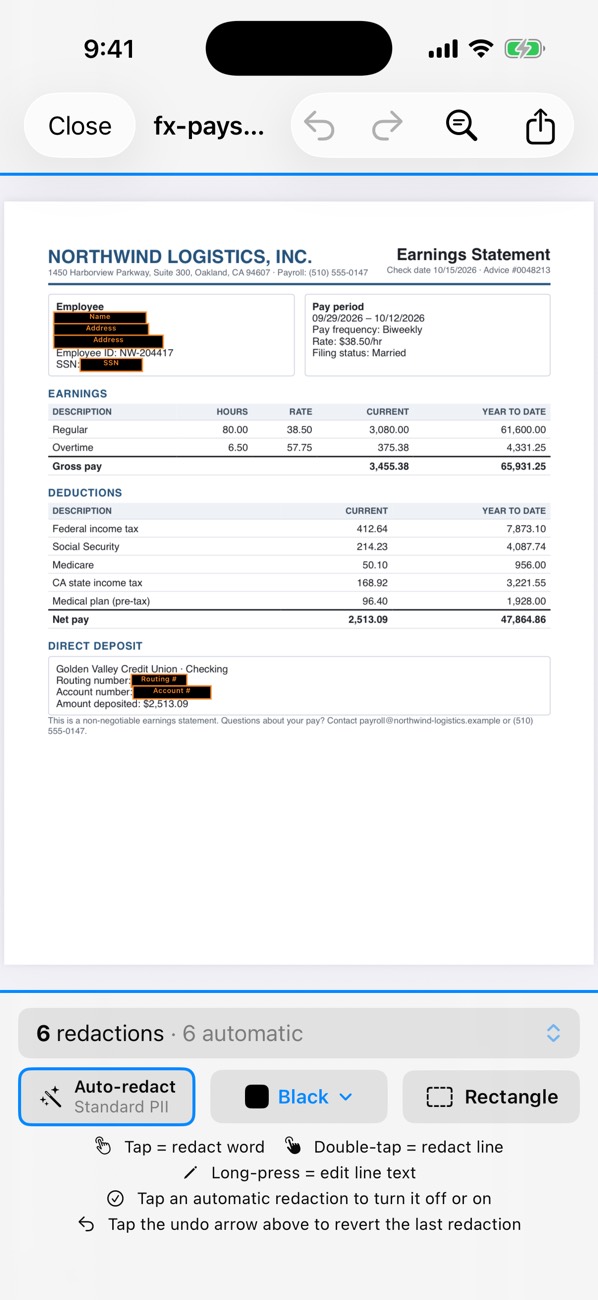
A landlord needs to see that you are who you say you are and that you earn enough; they rarely need your full account numbers, every purchase or your ID number. For each document, keep your name, the dates and the income or balance figures, and hide account numbers, transactions you don’t need to show, and ID numbers. Ask before redacting if the landlord uses a screening service.
| Document | Keep | Hide | Guide |
|---|---|---|---|
| Bank statement | Name, period, balances, income deposits | Account and routing numbers, other transactions | Bank statement |
| Pay stub | Employer, pay period, gross and net pay | SSN, employee ID, deposit account | Pay stub |
| ID or passport | Name, photo | ID number, barcode or machine-readable zone, signature | ID photo |
| Utility bill | Name, address, date | Account and reference numbers | Utility bill |
| Tax return or W-2 | Income lines, tax year | SSNs, bank details | Tax forms |
Before you send anything
- Confirm the listing and the landlord or agent are real before sending financial documents.
- If they use a tenant-screening service for credit and background checks, your SSN goes to that service through its own secure form, not by email.
- Never change numbers on a document; only remove information.
PDF Redact picks a preset from the kind of document it sees (statements, tax forms, legal documents), and you can switch presets in the detection settings. Every export is checked before you share it, and it all runs on your iPhone, so nothing is uploaded along the way.
PDF RedactWorks on iPhone, iPad and Mac. Your first export is free.

Questions
- Will a landlord reject redacted documents?
- Most accept them if names, dates and amounts are readable. Some require originals; ask first.
Related guides
- Redact a bank statementFor a rental, loan or job application: what to hide and what to keep.
- Redact a pay stubProve income without exposing your SSN or bank account.
- Redact an ID or passport photoLicense numbers, barcodes and the passport MRZ.
Updated 2026-10-29.