Guides › Redact a W-2, 1099 or tax return
How to redact a W-2, 1099 or tax return
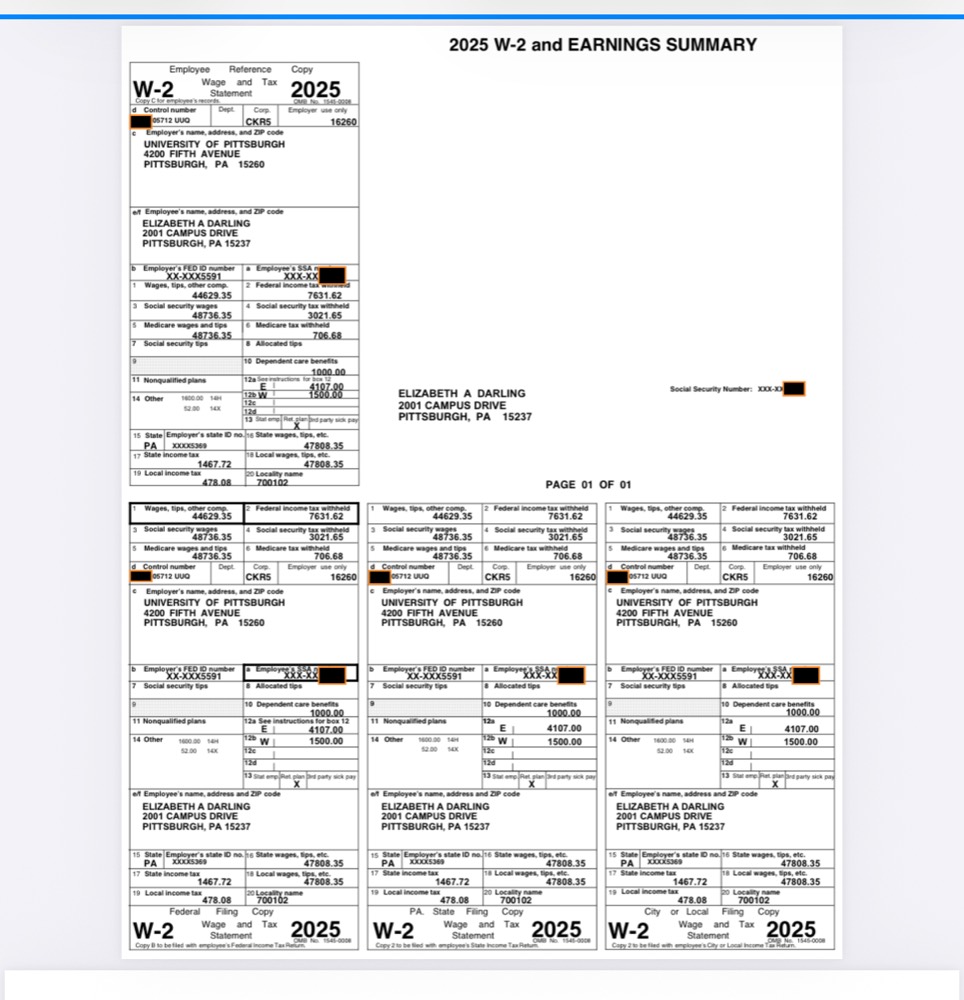
Open the form in PDF Redact. It recognises tax documents and applies the Tax Documents preset, which redacts Social Security numbers, employer identification numbers, dates of birth and bank account and routing numbers (for example the direct-deposit section of a 1040) while leaving the amounts readable. Review, export, and share the verified file.
What’s sensitive on common forms
| Form | Usually redact | Usually keep |
|---|---|---|
| W-2 | Employee SSN (box a), control number (box d) | Wages and withholding (boxes 1–6), tax year |
| 1099 | Recipient TIN, account number | Payer name, amounts |
| 1040 | SSNs of everyone listed, routing and account numbers for refunds | Income lines, AGI, tax, filing status |
Lenders verifying income sometimes need the employer EIN; leave it visible if they ask for it.
Steps
- Open the W-2, 1099 or return in PDF Redact.
- Check that the Tax Documents preset is selected in the detection settings, and review the boxes.
- Tap anything else you want hidden, such as your address or a dependent’s name.
- Export and check for Verified Clean.

PDF RedactWorks on iPhone, iPad and Mac. Your first export is free.

Questions
- Are typed values in fillable tax forms redacted?
- Yes. Typed form values are drawn into the rebuilt page, so a value under a redaction is removed with everything else under the box.
- Can I keep the last four digits of the SSN?
- Yes. Turn on Court filing format in the detection settings.
Related guides
- Redact a Social Security numberRemove SSNs from any PDF, or keep only the last four digits.
- Redact a pay stubProve income without exposing your SSN or bank account.
- Redact a bank statementFor a rental, loan or job application: what to hide and what to keep.
Updated 2026-10-29.