Guides › Redact a pay stub
How to redact a pay stub
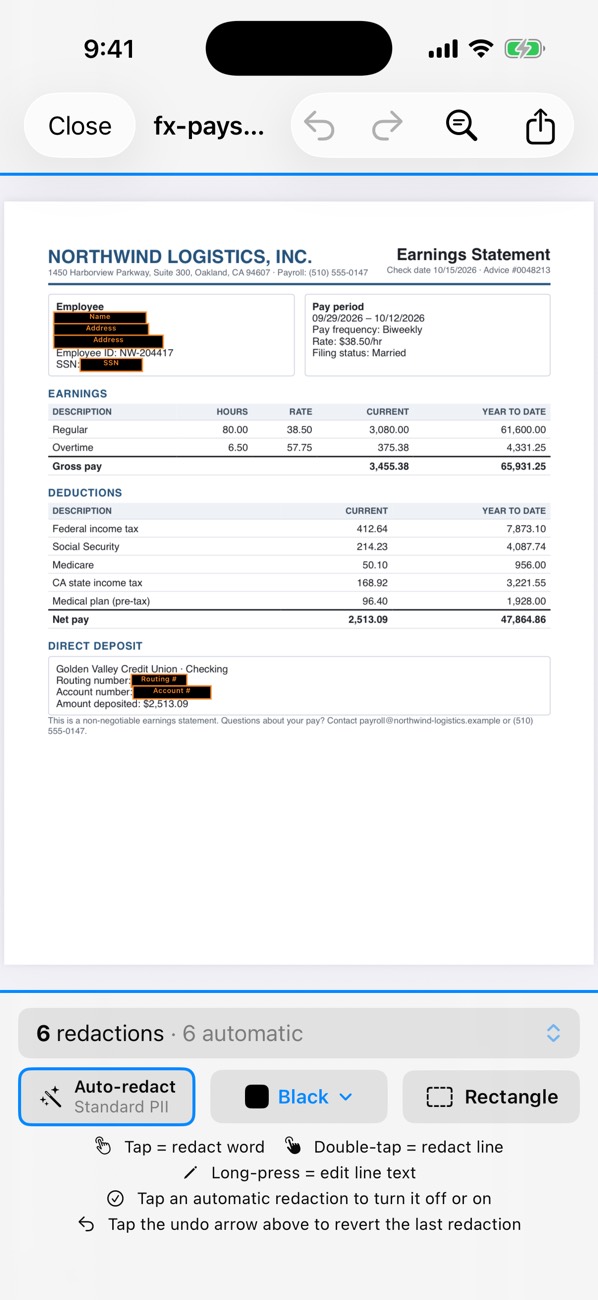
A pay stub proves income through the employer name, pay period, gross and net pay and year-to-date totals; keep those. Hide your Social Security number, employee ID and the bank account your pay goes to. PDF Redact finds the SSN, account numbers, names and addresses automatically; turn off anything the recipient needs to see, then export.
- Download the pay stub as a PDF from your payroll portal, or take a clear photo of a paper stub.
- Open it in PDF Redact and review the automatic redactions.
- Tap to add your employee ID or any other number you want hidden. Tap your name’s redaction to turn it off if the recipient needs to match it to you.
- Export the verified file.
Keep visible
- Employer name
- Pay period and pay date
- Gross pay, net pay and year-to-date totals
- Your name (so the recipient can match it to you)
Usually hide
- Social Security number (often already shown as the last four)
- Employee or file number
- Direct-deposit bank account and routing numbers
- Home address, if not required

PDF RedactWorks on iPhone, iPad and Mac. Your first export is free.

Questions
- Will a landlord accept a redacted pay stub?
- Usually, if income, dates and your name are readable. Ask first if you’re unsure.
Related guides
- Rental application documentsWhat to hide on statements, pay stubs and ID for a landlord.
- Redact a bank statementFor a rental, loan or job application: what to hide and what to keep.
- Redact a W-2, 1099 or tax returnHide SSNs, EINs and account numbers on tax forms.
Updated 2026-10-29.