Guides › Redact a contract
How to redact a contract before sharing it
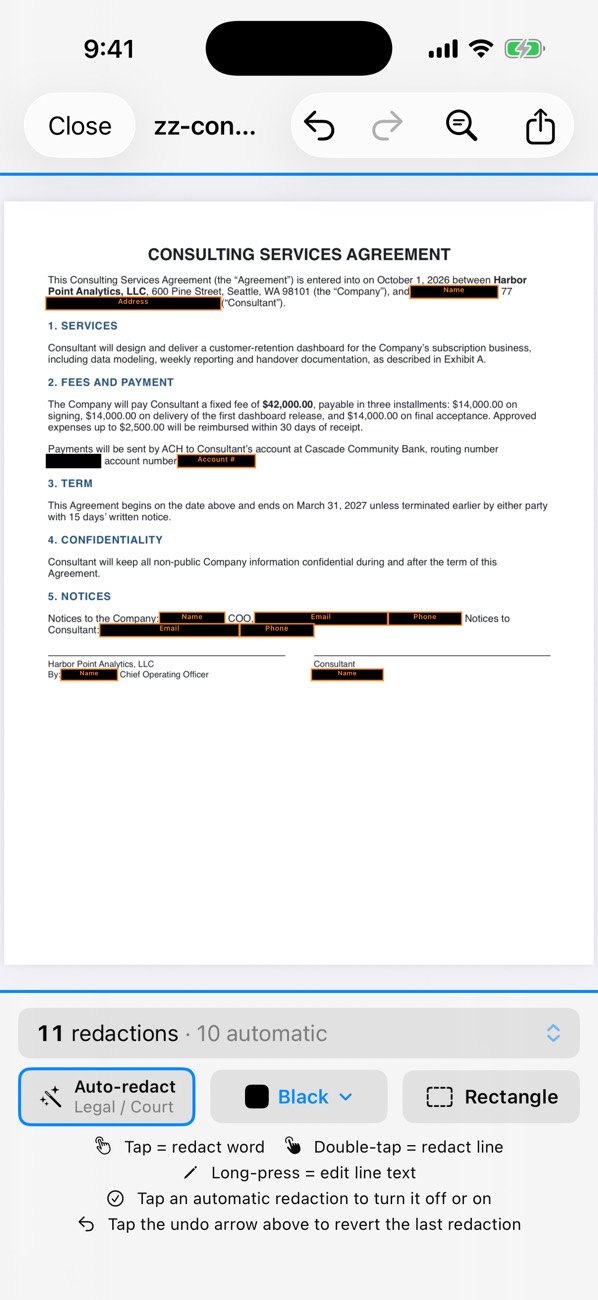
To share a contract’s terms without the deal itself, remove the parties’ names (everywhere they appear), addresses, prices and payment details, and the signatures. In PDF Redact, run the default preset for names, addresses and account numbers, turn on Amounts for prices, use Find & Redact to catch every mention of a company name, and draw boxes over signatures.
- Open the contract in PDF Redact; names, addresses, emails, phone numbers and account numbers are found automatically.
- In the detection settings, also turn on Amounts if prices should be hidden.
- Use Find & Redact for each party’s name or abbreviation (“Acme”, “the Company” is fine to keep) and redact every match.
- Draw a Rectangle over signatures, initials and stamps.
- Export the verified file.
Easy to miss
- Names in headers, footers and file names on each page
- Signature blocks and notary sections
- Bank details in payment clauses
- Exhibits and schedules at the end
PDF RedactWorks on iPhone, iPad and Mac. Your first export is free.

Questions
- Does Find & Redact catch names inside scanned pages?
- Yes, on-device text recognition makes scanned pages searchable for Find & Redact.
Related guides
- Hide prices on an invoice or quoteForward a quote or prove a purchase without the amounts.
- Check a PDF is really redactedFour tests that catch fake redactions before you send.
- Redact a PDF on MacPreview’s Redact tool vs. automatic detection on the Mac.
Updated 2026-10-29.