Guides › Redact employee records
How to redact employee records (I-9, W-4, personnel files)
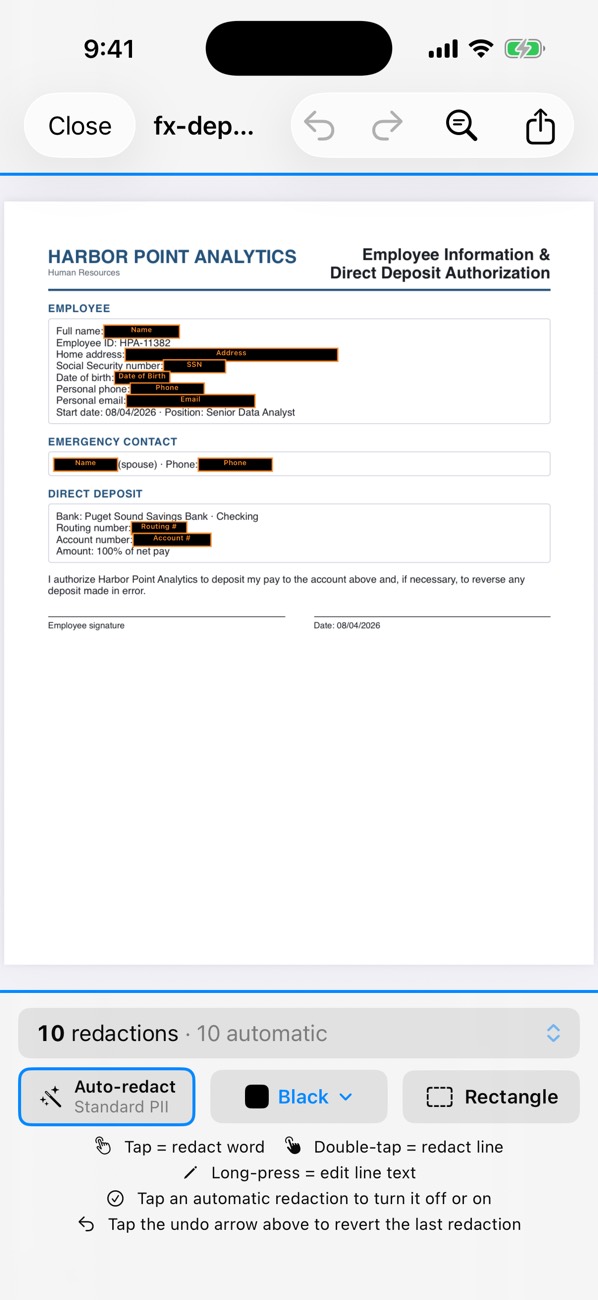
HR files are dense with identifiers: SSNs on W-4s, dates of birth and document numbers on I-9s, bank details on direct-deposit forms. Before sharing them with an auditor, a lawyer or another department, remove what isn’t needed. PDF Redact finds SSNs, dates of birth, addresses, phone numbers, emails and account and routing numbers automatically, on the device, and Batch Redact handles a whole folder at once.
- For one file, open it in PDF Redact. For many, choose Batch Redact and select them all; it runs on iPhone, iPad and Mac, and is fastest on a Mac.
- Review the automatic redactions. Typed values in fillable forms are covered as well as printed text.
- Cover document numbers on I-9s (passport, license or work-authorization numbers) by hand with a rectangle; they don’t follow one format.
- Export. Each file is audited before you share it.
Commonly redacted
- SSN (W-4, payroll records)
- Date of birth (I-9, benefits forms)
- Home address and personal phone
- Bank account and routing numbers (direct-deposit forms)
- Identity and work-authorization document numbers (I-9)
Retention and disclosure rules for employee records vary by state and purpose; follow your legal or compliance team’s guidance on what must be produced unredacted.

PDF RedactWorks on iPhone, iPad and Mac. Your first export is free.

Questions
- Is batch redaction included in the free export?
- No. The free export covers one document; batch needs a subscription.
Related guides
- Batch redact PDFsApply the same redaction rules to many documents at once.
- Redact a W-2, 1099 or tax returnHide SSNs, EINs and account numbers on tax forms.
- Redact a Social Security numberRemove SSNs from any PDF, or keep only the last four digits.
Updated 2026-10-29.